
A quarterly update is two dates plus category totals, and nothing else. For a sole trader that is 15 totals: turnover, other business income and 13 expense lines. Every update runs from 6 April, not from the end of the last one. Deadlines are 7 August, 7 November, 7 February and 7 May. Source: HMRC’s quarterly update direction.
The MTD quarterly update, what to include in it and what to leave well alone, is a shorter list than most people brace for. It is not a mini tax return. HMRC’s own wording is that updates “are summaries, not tax returns”, and that you “do not need to make any accounting or tax adjustments before sending an MTD quarterly update”. Four times a year your software adds up the records you have already created and sends the totals. That is it.
The part that trips people is the period. Read on before you file your first one.
Table of Contents
What to include in an MTD quarterly update, in full
HMRC’s quarterly update direction, made under regulation 10 of the Income Tax (Digital Obligations) Regulations 2026, lists exactly three things for a trading business:
- the quarterly update period start date
- the quarterly update period end date
- totals of the amounts falling within each income and expense category
The categories are the Self Assessment ones. Two on the income side, thirteen on the expense side. Your software should already be labelling your digital records with them.
| Business income | Business expenses |
|---|---|
| Turnover | Cost of goods bought for resale or goods used |
| Other business income | Construction industry, payments to subcontractors |
| Wages, salaries and other staff costs | |
| Car, van and travel expenses | |
| Rent, rates, power and insurance costs | |
| Repairs and maintenance of property and equipment | |
| Phone, fax, stationery and other office costs | |
| Advertising | |
| Business entertainment costs | |
| Interest on bank and other loans | |
| Bank, credit card and other financial charges | |
| Accountancy, legal and other professional fees | |
| Other business expenses |
Landlords get a different list. UK property runs to four income lines (total rent, other income from property, premiums for the grant of a lease, reverse premiums and inducements) and nine expense lines, with residential finance costs split out on their own. Foreign property is shorter still.
If your turnover is under £90,000 you can send two totals instead of fifteen: income and expense. That choice is made in how you categorise your records, not in the update itself.
Every MTD quarterly update starts on 6 April, not where the last one stopped
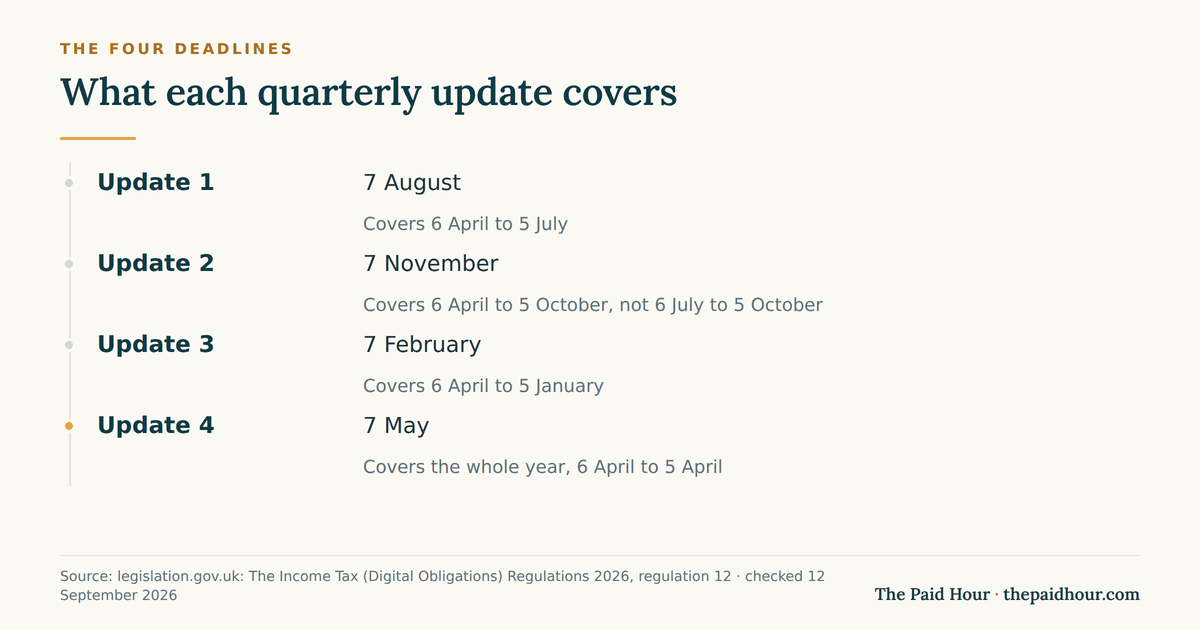
This is the single thing worth getting right. The regulations define quarterly update period 2 as “the period beginning with the relevant start date and ending with 5th October”. Not 6 July to 5 October. Six April to 5 October. Same for periods 3 and 4.
So each update restates the year to date. HMRC’s reason is practical: “This means you can correct your records without having to resend previous updates.” Fix a January mistake in February and the February update carries the corrected year-to-date figure. Nothing to reopen.
Compatible software handles this automatically. The risk is bridging software driven off a spreadsheet you built yourself, where it is easy to map a three-month column into a field expecting a cumulative one. Check the figure your software is about to send against your own year-to-date total before you press submit on the second update. Once, in November. After that you will trust it.
What you leave out of an MTD quarterly update
Plenty, and this is where the time saving lives. None of the following belongs in an MTD quarterly update:
- Tax adjustments, such as stripping out the personal share of a phone bill
- Accounting adjustments like prepayments and accruals (and if you use cash basis, which is the default, you never make these at all)
- Capital allowances, which go in before you submit the return, not during the year
- Reliefs and allowances, including the trading allowance and Rent-a-Room relief
- Employment income, dividends, savings interest, pensions, partnership profit share
- The receipts and invoices themselves, which HMRC never receives
Budget update, 28 October 2026: the trading allowance rises from £1,000 to £3,000 from 6 April 2027, and the Self Assessment reporting threshold for trading income moves to £3,000 with it. For the 2026/27 tax year the £1,000 limit still applies. GOV.UK policy paper.
All of that lands at the finalisation stage, which is a separate submission after the fourth update. You can add other income sources to your software during the year if it supports them, and some people do, but only to sharpen the running tax estimate. Those figures are not part of the update.
One more omission that surprises people: nothing. If you had no income and no expenses in a period you must still send the update to say so. A silent quarter is a missed quarter.
MTD quarterly update example: four updates for one copywriter
Ben writes copy for agencies in Bristol. Standard update periods, cash basis, one sole trader business, turnover building through the year. Here is what his software sends.
| Update | Period sent | Turnover | Expenses | That quarter alone |
|---|---|---|---|---|
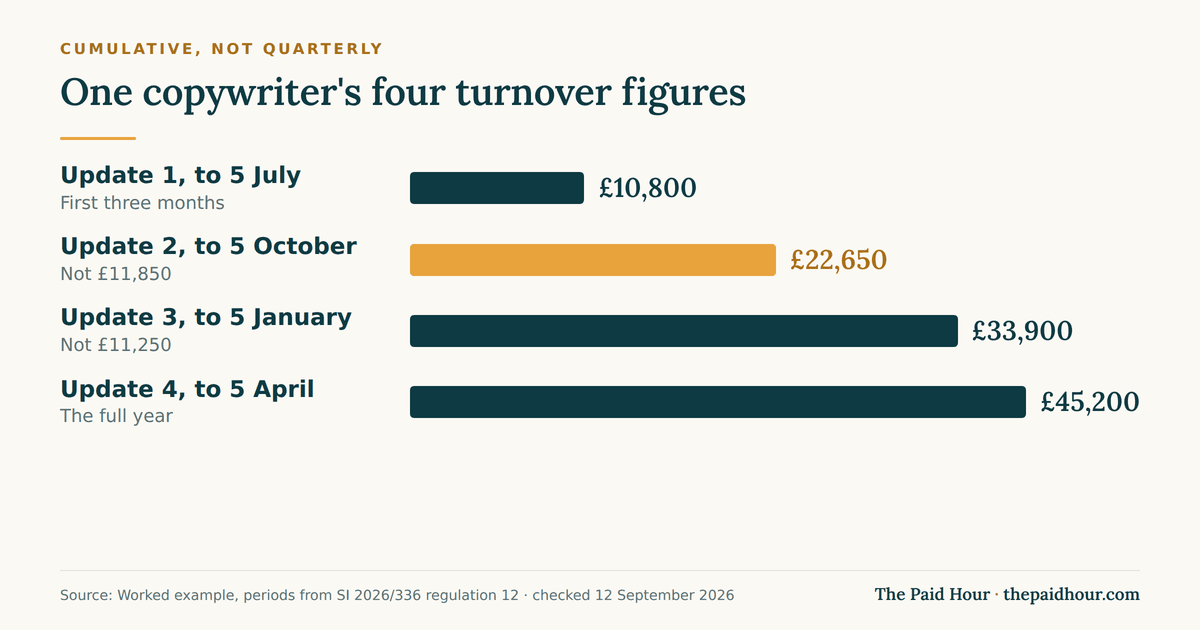
| 1, by 7 August | 6 Apr to 5 Jul | £10,800 | £2,140 | £10,800 |
| 2, by 7 November | 6 Apr to 5 Oct | £22,650 | £4,505 | £11,850 |
| 3, by 7 February | 6 Apr to 5 Jan | £33,900 | £6,980 | £11,250 |
| 4, by 7 May | 6 Apr to 5 Apr | £45,200 | £9,310 | £11,300 |
The right-hand column is the number Ben would send if he got the period wrong. £11,850 instead of £22,650 in November understates his year by £10,800 and makes the tax estimate look about half what it should be. That estimate is the whole point of filing quarterly, so it is a mistake that costs you the only benefit on offer.
Run his year to the end. Profit is £45,200 minus £9,310, so £35,890. Take off the £12,570 personal allowance and £23,320 is taxable. At the published 2026/27 rates that is £4,664 of income tax (20% of £23,320) plus £1,399.20 of Class 4 National Insurance (6% of £23,320), so £6,063.20 before anything else. The tax calculator runs the same sum on your figures. Rates for 2027/28 are not published yet, so treat that total as this year’s arithmetic on next year’s shape.
Note what Ben has not done at any point during the year: no adjustment, no allowance, no disallowable split. Those come after update four.
MTD quarterly update deadlines, the early window and calendar quarters
The four deadlines never move: 7 August, 7 November, 7 February, 7 May. They are the same whether you use standard periods ending 5 July, 5 October, 5 January and 5 April, or calendar periods ending 30 June, 30 September, 31 December and 31 March. Only the period ends differ. The deadline dates are fixed in the regulations, not set per taxpayer.
You can file any time from the end of a period up to the deadline, and you can go early by up to 10 days if you are confident no more transactions will land. That 10-day early window comes from HMRC’s rules, not from your software. Going away in early July with nothing else invoiced? File on 26 June and forget it.
Calendar quarters have to be elected in your software before the first update of the year, and you cannot switch once an update is sent. Worth it if your accounts already run to 31 March, pointless otherwise.
Four is a minimum, not a cap. Most compatible software will let you send an update on any day you like, and because every update is cumulative there is no penalty for doing it monthly. HMRC gives the example of sending 6 April to 5 August, then 6 April to 5 September, then 6 April to 5 October in place of one November filing. Useful if a big invoice has just landed and you want to see what it does to the tax estimate.
Missing an MTD quarterly update, and fixing update four
Late submission penalties are points based. Miss a deadline, collect a point. At four points you get a £200 penalty, and another £200 for each later miss. HMRC will not issue penalty points for late quarterly updates in 2026/27. If you joined MTD in April 2026, points for late updates start from 2027/28. The Budget on 28 October 2026 gave a one-year break only to people joining in April 2027, so their points start from 2028/29. Late tax returns and late payments are still penalised. How the points expire matters more than the £200 does.
You cannot submit your tax return until the updates are in, whatever the penalty position. That is the real enforcement.
After the fourth update, corrections work differently. Resend update four with the corrected figures, or adjust the category total in your software and match your records to it. Agents usually take the second route. Either way it has to be done before you finalise, and regulation 17 sets the outside date as the return deadline itself. If you want the whole cycle set up once and left alone, the Digital Bookkeeping System course walks through it.
Questions I get about this
Does an MTD quarterly update cover just three months?
No. Each one runs from the start of the tax year to the end of that update period, so the fourth covers all 12 months. Your software works it out, but check the second one by hand the first year.
Do I send an MTD quarterly update for each business?
Yes, one per source of self-employment income, and one for UK property and one for foreign property. Two sole trader trades means two updates every quarter. All UK properties count as a single property business.
Do I have to pay tax when I send an MTD quarterly update?
No. Payment dates have not changed: 31 January and 31 July, with payments on account where they apply. The estimate you see after an update is information, not a demand.
5 costly MTD quarterly update mistakes to avoid

- Sending only the last three months. Every MTD quarterly update is cumulative from 6 April. Send the year to date.
- Leaving out an income source. Each sole trade and each property business needs its own update, even a nil one.
- Recording invoices instead of payments. On the cash basis, income counts when the money arrives, not when you raise the invoice.
- Making year-end adjustments too early. Capital allowances and private-use splits belong in the final declaration, not the quarterly update.
- Ignoring the tax estimate. The estimate HMRC shows after each update is the best guide to how much to set aside. Use it.
None of these mistakes costs a penalty point in your first MTD year, because HMRC is not applying points to late quarterly updates then. From your second year, a late update does. But each one makes your final declaration harder and your tax estimate less useful.
If you are setting this up this week
- Decide standard or calendar periods, and set it in your software before the first update of the tax year, because you cannot change it after.
- Confirm whether each income source is under £90,000, which decides 2 totals or 15.
- Before your second update, work out your own 6 April to 5 October totals and compare them to what the software is about to send.
- Put 7 August, 7 November, 7 February and 7 May in your calendar with a week’s warning on each.
- Leave every adjustment, allowance and capital allowance claim to the finalisation step, and note anywhere you are recording a gross figure you will need to reduce later.
- If a quarter is empty, still file. A nil update takes two minutes and stops a penalty point.
Why the MTD quarterly update matters more than it looks
It is easy to treat the MTD quarterly update as admin. It is more useful than that. Four times a year you get a tax estimate based on real numbers, months before the January bill. If you act on it, by topping up your tax pot or reducing payments on account when income falls, the MTD quarterly update pays for the ten minutes it takes. From April 2029, when Self Assessment moves to regular in-year payments, those same habits will make the switch much easier.
Sources
- GOV.UK: Making Tax Digital for Income Tax quarterly update direction
- GOV.UK: Use Making Tax Digital for Income Tax, send quarterly updates
- legislation.gov.uk: The Income Tax (Digital Obligations) Regulations 2026
- GOV.UK: Use Making Tax Digital for Income Tax, create digital records
- GOV.UK: Adjust your self-employment and property income
- GOV.UK: Penalties for Making Tax Digital for Income Tax
- GOV.UK: Find out if and when you need to use Making Tax Digital for Income Tax
- GOV.UK: Income Tax rates and allowances
Figures checked against HMRC’s quarterly update direction, the Making Tax Digital guidance pages and SI 2026/336 on 12 September 2026. This is general information, not financial or tax advice.
MTD quarters coming and the books are a shoebox?
Digital Bookkeeping System (MTD-ready) 2026/27. Seven modules and a seven-sheet toolkit, built around a category-to-tax-box mapping table that makes your quarterly updates fill themselves.
- A software decision sheet costed over three years, split by turnover, VAT status and phone-or-desktop
- The chart of categories mapped to the Self Assessment and MTD boxes, and the three categories never to auto-categorise
- Weekly and month-end cards, an MTD quarter-close checklist, and an export-and-archive index so their cloud is never your only copy
Software is priced monthly, excluding VAT, and you will hold the subscription for years. Pick on the wrong number and the difference over three years is more than every course on this site combined.
Buying more than one? All ten 2026/27 courses for £107, against £293 bought separately.