
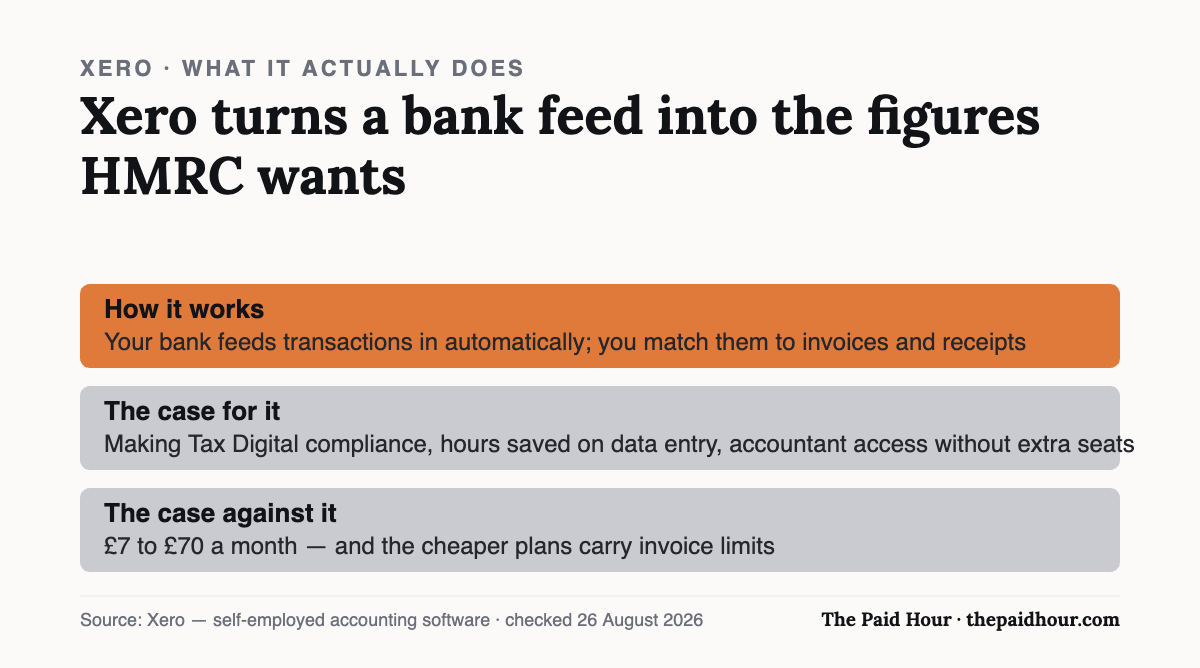
The one-paragraph answer: Xero is cloud accounting software: your bank feeds transactions in automatically, you match them to invoices and receipts, and it produces the figures HMRC wants. The case for it, Making Tax Digital compliance, hours saved on data entry, accountant access without extra seats. The case against: £7 to £70 a month, invoice caps on the cheap plans, and if you bank with NatWest, RBS, Ulster Bank or Mettle you already get FreeAgent free.
Disclosure. Some links further down are affiliate links, and we may be paid if you subscribe after clicking one. It costs you nothing extra and it has not shaped what is written here. Every price below links to the provider’s own page, which earns us nothing. See our affiliate disclosure.
Table of Contents
What is Xero,?
Xero is accounting software you use in a browser or a phone app rather than installing on a computer. Your records live on Xero’s servers, so the same books are available from your laptop, your phone and your accountant’s office at the same time. It’s a New Zealand company, says it has around five million customers worldwide, and in the UK it claims over 200,000 certified accountants and bookkeepers work with it.
Strip away the marketing and it does four jobs. Everything else is a variation on these.
- It pulls in your bank transactions automatically, through Open Banking.
- It captures your paperwork: you photograph a receipt and it reads the numbers off it.
- It sends invoices and chases payment, including taking card and bank payments on the invoice itself.
- It turns all of that into returns and reports: VAT to HMRC, Making Tax Digital submissions, profit and loss.
The point isn’t any one of those on its own. It’s that they’re joined up. A payment lands in your account, Xero already knows which invoice it belongs to, marks it paid, and the figure’s in your VAT return without you touching a spreadsheet.
How it works, day to day
The bank feed
You connect your business account once, through Open Banking, and transactions arrive on their own. Xero then suggests what each one is, this £42 looks like your usual phone bill, this £900 matches invoice 104. You confirm or correct. That confirming step is called reconciliation, and on a small sole trader account it’s a few minutes a week rather than an evening a month.
One thing to check before you assume this is free: Xero says most UK bank feeds cost nothing, but some UK banks charge for the feed and Xero passes that charge straight on to you. Check your own bank on Xero’s banking partners page instead of assuming.
Receipts and bills
Hubdoc is included on every Xero business plan. You photograph a receipt with your phone, it extracts the supplier, date and amount, and creates the transaction. The document itself is stored against the entry, which is the part that matters if HMRC ever asks you to evidence a claim years later.
Invoicing and getting paid
You build an invoice, it goes out by email or SMS, and you can attach a payment method so the client pays from the invoice itself: Stripe, GoCardless, Klarna, Pay by Bank, or Tap to Pay on a phone. Xero’s claim is that invoices with a payment service attached get paid roughly twice as fast; that figure comes from Xero’s own analysis of UK invoices sent between September 2024 and March 2025, so treat it as a vendor statistic rather than an independent finding. The underlying logic holds up though: removing the step where someone has to open their banking app removes a delay.
If late payment is your actual problem, the software’s only half of it, see what you can legally charge on a late invoice.
Filing
Xero is HMRC-recognised for Making Tax Digital for VAT, and you submit VAT returns straight from it. For MTD for Income Tax, which starts affecting sole traders from April 2026, all its business plans are described as ready, but note Xero’s own wording that MTD for Income Tax filing is in beta, subject to registration and eligibility. If MTD for Income Tax is the reason you’re buying, check the current state of that before you commit rather than after.
What you actually get out of it
Four benefits are real and worth naming plainly.
Time. The saving isn’t in the accounting, it’s in the typing. Bank feeds and receipt capture remove the transcription work, which is the part of bookkeeping people put off until it becomes a whole weekend. Xero says four in five customers report saving six hours a month — again, its own survey, of 373 businesses globally in October 2025.
Compliance you don’t have to think about. Making Tax Digital requires digital records and quarterly submissions. Doing that from a spreadsheet is possible but fiddly; doing it from software built for it is the difference between a task and a non-event. This is honestly the single strongest argument for paying for any tool of this kind in 2026.
Knowing where you stand. A live profit and loss and a cash flow forecast (30 days on the cheapest plans, up to 180 on the most expensive), tell you whether you can afford the equipment or the tax bill. Most sole traders run on the balance in their current account, which is a bad proxy because it ignores the tax sitting in it that isn’t really theirs.
Your accountant can just look. Xero includes unlimited general users, so inviting your accountant costs nothing extra. That sounds small and it isn’t: it removes the annual ritual of exporting, emailing and answering questions about a spreadsheet. Already have an accountant? Ask them which software they use before you buy anything, their preference is worth more than a few pounds a month.
Xero also publishes figures that 91% of customers agree it’s easy to use, 90% of UK customers agree it helps them stay compliant, and 88% say it improves financial visibility. These come from Xero’s own customer surveys in 2024. They’re not independent research and we wouldn’t lean on them, but they’re at least disclosed with sample sizes, which is more than most vendors manage.
What it costs, with the parts people miss
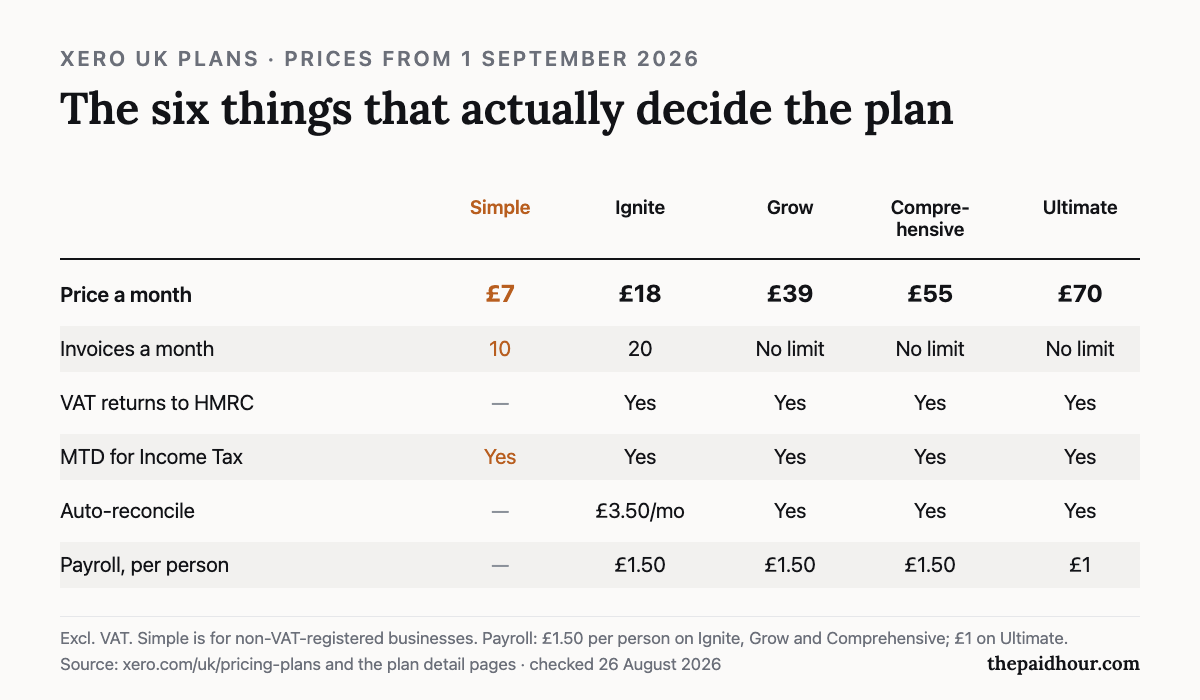
From 1 September 2026 the UK prices are £7 for Simple, £18 for Ignite, £39 for Grow, £55 for Comprehensive and £70 for Ultimate, all excluding VAT. Four of those five went up on that date, the detail’s in our guide to the September 2026 price change.
Three things that aren’t in the headline price:
- The intro offer ends. New UK customers get 90% off for six months (checked 7 September 2026; Xero changes this offer from time to time). Budget for the standard price from month seven, because that’s what you’ll pay for years two, three and four.
- Add-ons on the cheap plans. On Ignite, auto-reconcile is £3.50 a month and payroll is £1.50 per person. CIS returns are £5 a month on any plan. An £18 plan can quietly become £27.
- VAT, if you can’t reclaim it. Every price above excludes VAT. If you’re not VAT registered, add 20% and you can’t claim it back.
Two contract details worth knowing: subscriptions auto-renew monthly and you cancel with one month’s notice, and if you upgrade a plan you have to wait a month before you can drop back down. Upgrading’s instant; downgrading isn’t.
Xero for the self-employed: which plan does a sole trader need?
Xero sells five plans and most of them are built for businesses with staff. A sole trader is choosing between two, and the answer turns on one question: are you VAT registered?
If you are not VAT registered, start at Simple, £7 a month. It handles bank reconciliation, receipts and Making Tax Digital for Income Tax, which is the thing most sole traders are buying software for, and it is the only Xero plan whose price did not rise on 1 September 2026. The catch is ten invoices a month. That is a hard cap rather than a guideline. Send eleven and you are upgrading mid-month.
If you are VAT registered, Simple is not available to you and Ignite at £18 is the floor, because filing a VAT return to HMRC starts there. Ignite doubles the invoice allowance to twenty and adds CIS, which matters if you work in construction. Watch the add-ons: auto-reconcile is £3.50 a month on Ignite and included from Grow upwards, so an £18 plan is really £21.50 if you want the feature that saves the most time.
Grow at £39 is where the invoice cap disappears. For a one-person business that is usually the wrong answer, you are paying £252 a year more than Ignite to remove a limit you may never hit. Count your invoices for a real month before assuming you need it. A consultant billing four retainer clients is nowhere near twenty; a photographer invoicing every shoot might be over it by the third week.
One thing worth saying, because Xero will not say it: if you bank with NatWest, Royal Bank of Scotland, Ulster Bank or Mettle, FreeAgent comes free with the account and has no invoice cap at all. On the numbers that is the better deal for a large share of sole traders, and it is why the honest recommendation here often sends people away from the product this page is about.
Who shouldn’t pay for Xero
Three groups, and we’d rather say so than sell you something.
- Anyone banking with NatWest, RBS, Ulster Bank or Mettle. FreeAgent comes free with those accounts and it’s the full product rather than a stripped-down version. NatWest Group owns FreeAgent, which is exactly why the offer exists. Read the head-to-head comparison before you spend anything.
- Anyone under the Making Tax Digital thresholds with very simple affairs. If you file one straightforward return a year and have a handful of transactions, software may be solving a problem you don’t have. A spreadsheet and good records are legal and free.
- Anyone whose accountant already uses something else. Fighting your accountant’s workflow costs more in their time than you save on the subscription.
And a fourth, softer one: if you’re choosing on the headline discount, stop. The 90% offer is real, but the plan limits are what you actually live with. Ignite caps you at 20 invoices a month and Simple at 10, and on Simple, invoices created automatically by connected apps count towards that limit. Count your last three months of invoices before you pick.
How to try it without committing
- Take the 30-day free trial. No card needed to start.
- Connect your real bank account, not a test one. The bank feed is the whole product; if it doesn’t work properly with your bank, nothing else matters.
- Put a month of real transactions through it and see how long reconciliation takes you.
- Count your invoices for that month. That number picks the plan.
- Ask your accountant to log in and tell you whether it’s set up sensibly.
If after a month it hasn’t saved you time, it won’t save you time in month six either. Cancel, and keep the spreadsheet.
Where to sign up: what is Xero’s free trial like?
Xero free trial
Thirty days, no card needed to start. Connect your real bank account and put a month of actual transactions through it before you decide.
Start a Xero trialFreeAgent
If you bank with any of those, this is the full product at no cost. Check this before you pay Xero anything.
Visit FreeAgent (or go direct: freeagent.com/pricing)Correction, 26 August 2026: the plan comparison chart previously showed payroll as a number of people included with each plan. Xero charges payroll per person: £1.50 a month each on Ignite, Grow and Comprehensive, £1 on Ultimate. The chart has been redrawn. See the corrections log.
Picking software, or fixing the one you have?
Digital Bookkeeping System (MTD-ready) 2026/27. Seven modules and a seven-sheet toolkit, built around a category-to-tax-box mapping table that makes your quarterly updates fill themselves.
- A software decision sheet costed over three years, split by turnover, VAT status and phone-or-desktop
- The chart of categories mapped to the Self Assessment and MTD boxes, and the three categories never to auto-categorise
- Weekly and month-end cards, an MTD quarter-close checklist, and an export-and-archive index so their cloud is never your only copy
Software is priced monthly, excluding VAT, and you will hold the subscription for years. Pick on the wrong number and the difference over three years is more than every course on this site combined.
Buying more than one? All ten 2026/27 courses for £107, against £328 at full price.
How this review was put together. This is a documentation-based review. The figures come from Xero’s own published pricing and help pages and, where relevant, HMRC’s software lists, checked on the date shown at the end of the article. It does not rest on a paid account or on running the product with live client data, and where a point comes from the provider’s marketing instead of something independently checkable, the text says so.
Sources
- Xero UK pricing plans, plan limits and offer terms
- Xero: Upcoming UK price changes
- Xero, Self-employed accounting software, including its own survey figures
- Xero. Simple plan details and invoice limit
- HMRC, Making Tax Digital for Income Tax
Prices and plan limits checked 19 August 2026 and exclude VAT. Percentages quoted about customer satisfaction come from Xero’s own surveys and are labelled as such. Providers change pricing and features without notice, confirm on Xero’s own site before you buy. This is general information, not financial or tax advice.
Need an invoice that’s already sorted?
Editable, HMRC-compliant invoice templates, no subscription.
Browse templates