
A missed appointment is not a small annoyance when you are the business. Charge 45 pounds an hour, have two people a month fail to show up, and that is 1,080 pounds a year you cannot bill to anyone. Nobody reimburses an empty hour.
Booking software gets sold to you on convenience, the tidy online calendar and the automatic confirmation email. The part that pays for itself is narrower than that. It is the reminder that goes out without you remembering to send it, and the ability to hold some of the client money before they walk through the door.
So this compares five booking tools on the two questions that decide it for a UK sole trader: what does the free plan really give you, and what does it cost to make a no-show cost the client something instead of you.
One thing up front. Everything below comes from each provider own pricing and feature documentation, checked on 4 September 2026. This is a documentation comparison rather than a review written after running a diary on all five.
Five free plans, and where each one stops
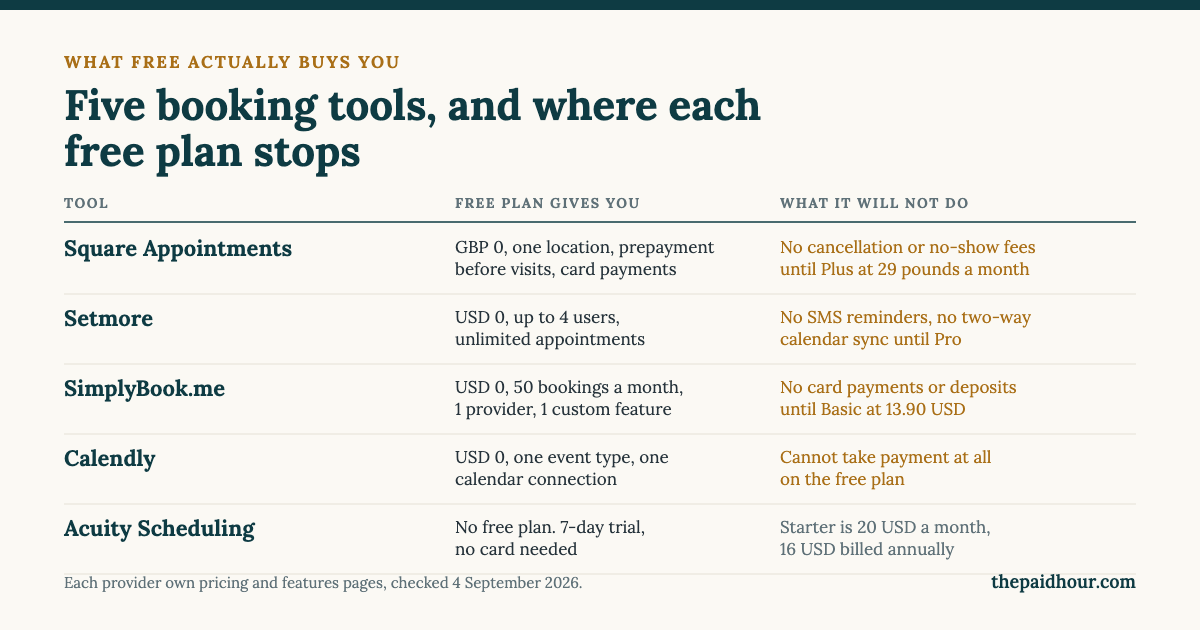
Free means five different things here. Setmore gives away the most raw capacity. Square gives away the most useful capacity. SimplyBook.me gives you a working shop window but no till. Calendly gives you a single link. Acuity gives you a week.
Square Appointments, the only one priced in pounds
Every other tool on this page bills in US dollars. Square publishes UK pricing in sterling: 0 pounds, 29 pounds and 69 pounds a month per location.
That is worth more than it looks. A 13.90 dollar subscription is not a fixed pound amount. It moves with the exchange rate every month, and most personal and business cards add a foreign transaction fee of roughly three per cent on top. Neither number appears on anyone pricing page, and neither shows up in your forecast until the statement arrives.
The free plan is properly free: one location, unlimited calendars, email and text reminders, and prepayment before visits. Card rates in the UK are 1.75 per cent in person on the free plan, 1.6 per cent on Plus and Premium, and 1.4 per cent plus 25p for online UK cards.
Where it stops is the bit that matters. Cancellation policies and no-show fees sit on Plus, 29 pounds a month. So the free plan can reduce no-shows with reminders, and it can take money up front, but it will not automatically charge someone who cancels an hour before.
Setmore, the most generous free tier
Free covers up to four users and unlimited appointments. Nobody else gives away that much. If you work with one or two other people and run a lot of short slots, that is difficult to beat on price.
The catch is reminders. SMS reminders and two-way calendar sync are on Pro, 5 dollars per user a month billed annually, or 12 dollars billed monthly. Email reminders are included free. Whether that is enough depends entirely on whether your clients read email, and for most appointment-based work the honest answer is that they do not.
SimplyBook.me, the one built around taking money up front
This is the one to look at if no-shows are your actual problem rather than a vague irritation. It is also the one with the limit almost nobody mentions.
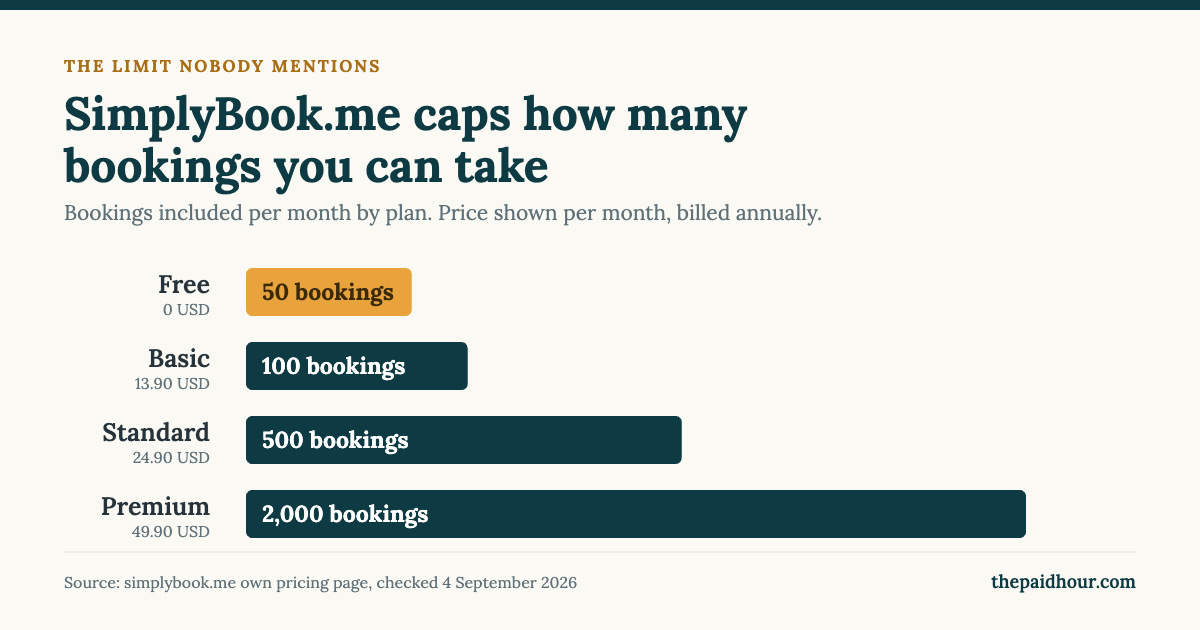
SimplyBook.me counts your bookings. Free allows 50 a month with one provider and one custom feature. Basic allows 100, at 13.90 dollars a month or 11.90 paid annually. Standard allows 500, at 29.90 a month or 24.90 annually. Premium allows 2,000, at 59.90 a month or 49.90 annually. Run past the cap and, in their own words, you either upgrade or buy additional bookings separately.
A hundred bookings a month sounds generous until you count properly. A mobile therapist doing five appointments a day, five days a week, is at 100 by the last week of the month. A tutor with eight sessions a day in exam season is past it well before that.
What you are buying at Basic is payment processing, and with it deposits and prepayment, plus intake forms, cancellation and rescheduling rules, packages and memberships, and a full booking website instead of a single scheduling link. Payment processing starts at Basic, so the free plan cannot hold a deposit at all.
The deposit is the whole argument. A client who has paid 15 pounds to hold a slot turns up, or you keep the 15 pounds. Both outcomes beat an empty hour and a polite text message.
The mechanics of that are worth knowing before you subscribe: which features a deposit consumes, what the cancellation policy does and does not do, and what UK consumer law lets you keep. Our SimplyBook.me review goes through all three.
Calendly and Acuity are a different shape
Calendly free gives you one event type and one calendar connection, and it cannot collect payment at all. Paid starts at 10 dollars per seat a month. Calendly is built for consultations and sales calls, where the appointment is the start of a conversation rather than the thing being sold. If money changes hands at the appointment, it is the wrong shape.
Acuity has no permanent free plan, only a seven-day trial with no card needed. Starter is 20 dollars a month, or 16 dollars billed annually. It is capable software, but you are paying Acuity prices for scheduling that Square hands you free, unless you have a specific reason you need what Acuity adds.
Deposits, no-show fees and what HMRC expects
Two things to get right before you start holding client money.
When a deposit counts as income. If you use the cash basis, which is the standard way for a sole trader to record income and expenses, HMRC guidance is that you only record income or expenses when you receive money or pay a bill. A deposit taken in March is March income even if the appointment is in April. It does not wait for the service to happen.
The subscription is an allowable expense. HMRC allowable expenses guidance covers computer software if your business makes regular payments to renew the licence, even if you use it for more than two years. A monthly booking subscription is precisely that. Keep the provider invoices, not just the card statement line, because the statement line is not a receipt.
More on the mechanics of holding client money in our guide to invoicing deposits and part payments, and on what the card fees actually come to in what it costs a freelancer to accept card payments.
What I would pick
- You need a calendar and card payments, nothing clever: Square Appointments free. It costs nothing, it is priced in pounds, and it will already take a prepayment.
- No-shows are costing you real money: SimplyBook.me Basic at 13.90 dollars a month. Deposits and cancellation rules at a third of what Square charges for the same job. Watch the 100-booking cap.
- Two to four of you, lots of short appointments: Setmore free, and Pro if your clients need text reminders rather than email.
- Consultation calls with no payment at booking: Calendly free is enough, and honest about being enough.
- Acuity: only after you have looked at the other four and can name the thing it does that they do not.
The uncomfortable version of that list: if you are losing more than one appointment a month, the cheapest booking tool is not the free one.
Where to sign up
Square Appointments
Free, priced in pounds, prepayment and card payments included. No cancellation or no-show fees until Plus at 29 pounds a month.
Visit SquareSimplyBook.me
Deposits, prepayment and cancellation rules from 13.90 dollars a month on Basic. Capped at 100 bookings a month on that plan.
Try SimplyBookSetmore
Free for up to four users with unlimited appointments. Text reminders need Pro at 5 dollars per user a month.
Visit SetmoreSources
- SimplyBook.me: Pricing plans
- SimplyBook.me: Features
- Square Appointments UK: Pricing
- Setmore: Pricing
- Calendly: Pricing
- Acuity Scheduling: Pricing
- HMRC: Expenses if you are self-employed: office, property and equipment
- HMRC: Cash basis
Prices, plan limits and feature tiers checked against each provider own pages on 4 September 2026. Corrected on 7 September 2026: an earlier version of this guide said SimplyBook.me will charge someone who does not turn up. It does not. It takes a deposit before the appointment, and its cancellation policy feature only controls how late a client is allowed to cancel. Dollar prices are billed in US dollars, so the sterling amount depends on the exchange rate on the day and any card fee your bank adds. This is general information, not financial or tax advice, and which tool suits you depends on your circumstances.