
Before you read on: HMRC does not care whether your accounting software runs in a browser or on your own laptop. Its Making Tax Digital for Income Tax guidance sets out four things the software must do, and never once uses the word cloud or the word desktop. What has changed is the money. VT Transaction+, a UK desktop package that is HMRC recognised for MTD, is £90 a year, a subscription rather than a one-off purchase, and FreeAgent is £0 if you bank with NatWest, RBS, Ulster Bank or Mettle. Buy it once, own it forever quietly stopped being true.
Cloud vs desktop accounting software is usually argued on principle: your records on your own machine, or your records on somebody else’s server. For a UK sole trader in 2026 that is the least interesting part of the decision. The compliance argument is not the one you have been told, the cost argument does not survive contact with today’s prices, and the thing that is easy to miss turns one piece of software into two.
What HMRC asks of your accounting software
HMRC’s guidance on choosing software for Making Tax Digital for Income Tax, last updated 13 July 2026, is short. The software has to:
- support all your income sources
- let you make your submissions to HMRC: send quarterly updates and submit your tax return
- allow you to report all your other income sources to complete your tax return
- work with your accounting period
Read that list again and notice what is missing. Not one word about where the software runs. HMRC also allows bridging software outright, describing it as connecting to existing records kept in spreadsheets or other accounting tools, a description that fits a desktop program keeping records on your hard drive as neatly as it fits a spreadsheet. There is more on how bridging software actually works, and on what HMRC recognised does and does not mean.
So the compliance case for going cloud, which is the case most comparison pages lead with, is not HMRC’s case. It belongs to the software industry.
Who this applies to: Making Tax Digital for Income Tax started on 6 April 2026 for sole traders whose qualifying income was over £50,000 in 2024/25. £30,000 follows on 6 April 2027, £20,000 on 6 April 2028. Below that it is not compulsory yet.
Cloud vs desktop accounting software: the cost argument
Desktop’s whole pitch was pay once, own it. Check what that costs today.
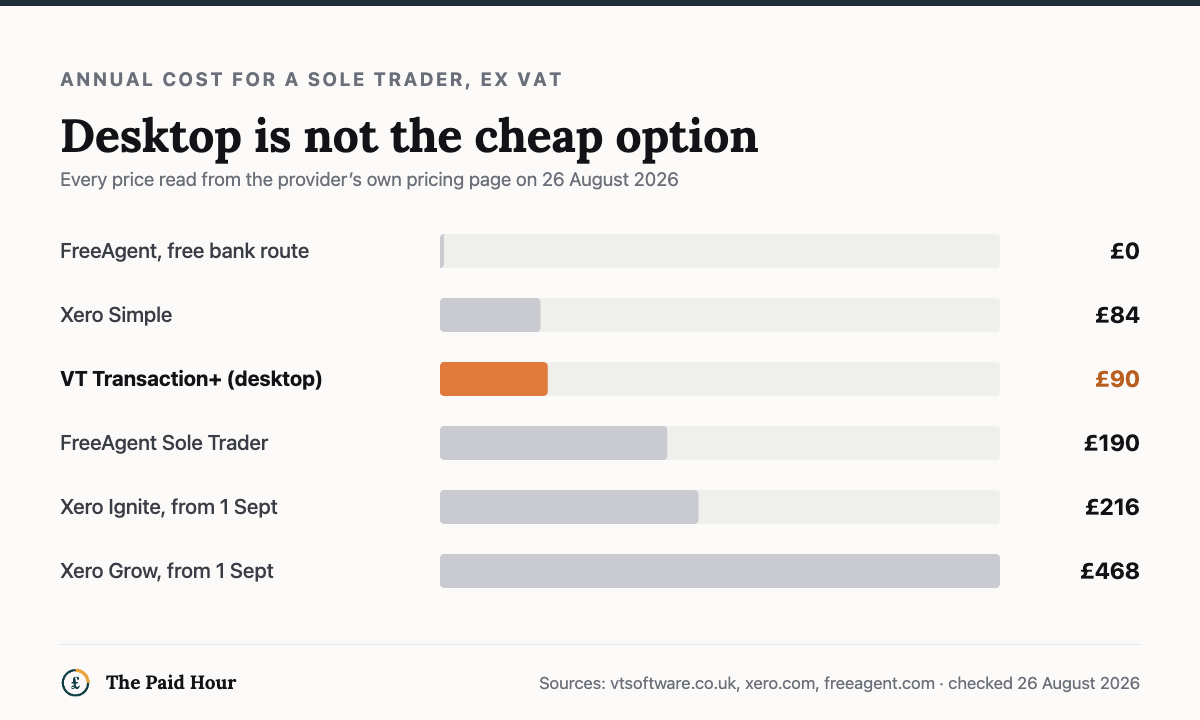
Take VT Software, a UK desktop package whose own site says its programs are HMRC recognised as MTD for Income Tax compatible. VT Transaction+ is £90 for one year, per user, excluding VAT. That is a subscription. VT Cash Book is free, but only, in VT’s own wording, if you do not require MTD functionality. The submissions need the Transaction+ subscription.
£90 a year, then. Now the cloud side, every figure read from the provider’s own pricing page on 7 September 2026, all excluding VAT:
- Xero Simple: £7 a month, £84 a year. The only Xero plan whose price did not go up on 1 September 2026.
- Xero Ignite: £18 a month. £216 a year, capped at 20 invoices and 10 bills a month.
- FreeAgent Sole Trader: £19 a month, £190 a year. Or £0 if your business account is with NatWest, Royal Bank of Scotland or Ulster Bank, or Mettle with at least one transaction a month.
The cheapest compliant desktop route costs more than Xero’s cheapest plan, and considerably more than FreeAgent costs a NatWest customer, which is nothing at all. Desktop is not the cheap option. It is a mid-table option that happens to run on your own machine.
The Xero line is worth reading twice, because it shows what a subscription is. Xero’s own pricing update says the increase applies to new and existing UK subscribers from 1 September 2026. Existing customers do not keep the price they signed up at. We have been through what the September 2026 Xero increase changes, plan by plan.
Your accounting software has two jobs: quarterly updates and the final declaration
This is the part that turns one piece of software into two, and you will not find it in a comparison table. It is on VT’s own website.
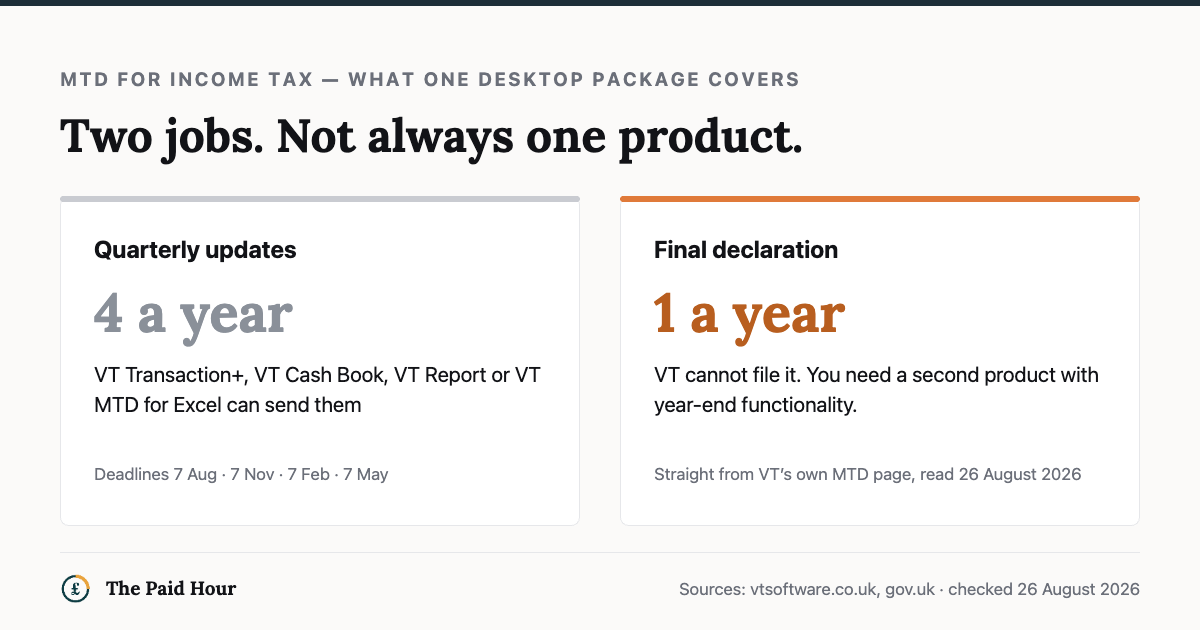
You can send quarterly updates from VT Transaction+, VT Cash Book, VT Report or VT MTD for Excel. Can you file the year-end final declaration from them? VT’s answer is no: that will need to be done from MTD software with year-end final declaration functionality. Credit to VT for stating it plainly on its own site.
Now look back at HMRC’s list. The requirement is software that lets you send quarterly updates and submit your tax return. A product that does the first and not the second means a second product, and a second product has a price. Budget for the pair rather than the licence. £90 plus a filing tool is a different number from £90.
There are four quarterly updates a year. HMRC’s deadlines are 7 August, 7 November, 7 February and 7 May, and each update is cumulative, it covers everything from the start of the tax year, not just the last three months. HMRC will not apply penalty points for late quarterly updates during the 2026 to 2027 tax year; after that, four points brings a £200 penalty. The quarterly deadlines in full are worth reading before your first one.
Where desktop accounting software still wins
Two things, and neither of them is price.
Your records keep working when the internet does not, and when the provider does not. A cloud outage is somebody else’s incident and your lost afternoon. If you work from a train, a client site with locked-down wifi, or somewhere the broadband is more of a rumour, that is not hypothetical.
And your data sits on your machine. Some people want that on principle, and the principle is defensible. Be honest about what it costs you, though. On your machine means on your backup, or gone. Cloud providers back up whether or not you remember to. A desktop setup with no backup is worse than any cloud plan, not better.
What is no longer a reason to choose desktop: saving money. What was never a reason: staying compliant.
So which accounting software should a sole trader pick?
If you bank with NatWest, Royal Bank of Scotland, Ulster Bank or Mettle, start with FreeAgent. It is free for as long as you keep the account, it is the full product instead of a cut-down tier, and it handles the tax return as well as the quarterly updates. We checked exactly how free FreeAgent is, and what the conditions are.
If you bank somewhere else and your affairs are simple, Xero Simple at £7 a month is the cheapest full-service route. Check the plan limits before you commit: the invoice caps on the cheap plans are where people get caught.
Disclosure. These run through a /go/ address and carry a sponsored tag. Today neither pays us anything. FreeAgent’s referral scheme pays account credit to its own paying subscribers and we are not in it; the Xero application is open, not live. FreeAgent leads here because it is free for the readers who qualify. If either starts paying, how we make money says so on the day. Full disclosure.
FreeAgent
The full product at no cost with those accounts, tax return and quarterly updates included. Paying for it otherwise rarely makes sense.
Visit FreeAgentXero
Xero Simple at £7 a month. Check the invoice caps before you commit, because that is where people get caught.
Visit XeroChoose desktop when you have a specific reason for it: offline working, data location, or years of records you would rather not migrate. Go in knowing you will probably need a second product for the final declaration, and price both.
And if your income is under £20,000 and you are not in Making Tax Digital yet, none of this is urgent. Whether you need accounting software at all is the question to answer first.
Picking software, or fixing the one you have?
Digital Bookkeeping System (MTD-ready) 2026/27. Seven modules and a seven-sheet toolkit, built around a category-to-tax-box mapping table that makes your quarterly updates fill themselves.
- A software decision sheet costed over three years, split by turnover, VAT status and phone-or-desktop
- The chart of categories mapped to the Self Assessment and MTD boxes, and the three categories never to auto-categorise
- Weekly and month-end cards, an MTD quarter-close checklist, and an export-and-archive index so their cloud is never your only copy
Software is priced monthly, excluding VAT, and you will hold the subscription for years. Pick on the wrong number and the difference over three years is more than every course on this site combined.
Buying more than one? All ten 2026/27 courses for £107, against £328 at full price.
Sources
- Choose the right software for Making Tax Digital for Income Tax — GOV.UK
- Find software that works with Making Tax Digital for Income Tax, GOV.UK
- Send quarterly updates. GOV.UK
- Check if you are eligible for Making Tax Digital for Income Tax: GOV.UK
- VT Software, products and pricing
- VT Software: Making Tax Digital for Income Tax
- Xero UK pricing update: xero.com
- FreeAgent pricing, freeagent.com
The four software requirements and the bridging wording come from HMRC’s guidance last updated 13 July 2026; the quarterly deadlines, the cumulative rule and the penalty position from HMRC’s guidance last updated 16 July 2026; the start dates and thresholds from HMRC’s eligibility guidance. All were read on 26 August 2026. VT’s £90 price and its answer on the final declaration were checked on vtsoftware.co.uk, and Xero’s and FreeAgent’s prices on their own pricing pages, all on 26 August 2026. Prices are the providers’ own, exclude VAT and change, check before you rely on them. General information, not financial advice; no affiliate links on this page.